
Router
12 min read
How to Fix Weak WiFi in Concrete Apartments: The Best Routers in BD Homes

The best router in BD right now is the Cudy WR3000 AX3000 for most households running fiber internet, and the Tenda F3 300Mbps for anyone on a tight budget under BDT 1,500. This guide reviews 9 WiFi routers across every price range in Bangladesh from BDT 1,300 to BDT 7,000. We evaluated routers wireless speed, signal coverage, connection stability, multi-device performance, and real-world suitability for Dhaka apartments and fiber broadband plans. First-time buyers, remote workers, students, families, gamers, and small business owners will all find a clear recommendation here.
Quick Recommendations from Rokomari
- Best Overall Router: Cudy WR3000 AX3000
- Best Budget Router: Tenda F3 300Mbps
- Router Under BDT 3,000: TP-Link Archer C54 AC1200
- Router Under BDT 5,000: Tenda AC8 AC1200 Gigabit
- Best WiFi 6 Router: ASUS RT-AX52 AX1800
- Mesh WiFi System: Ruijie RG-EW1200
- Perfect Router for Large Homes: NETGEAR R6220 AC1200
- Router for Small Apartments: Tenda F6 N300
What Is a WiFi Router?
A WiFi router is a networking device that receives your internet signal from an ISP and distributes it wirelessly to phones, laptops, smart TVs, and other connected devices. The router handles all wireless traffic management, security, and device connections within your local network. Choosing the wrong router for your internet plan or home size means paying for speed you can never actually use.
How to Choose the Best Router in Bangladesh: A Buyer's Decision Guide
Home Size and Wall Type: Bangladeshi concrete construction reduces WiFi signal more aggressively than timber-frame structures. Routers with 4+ antennas, Beamforming, or mesh support perform significantly better in concrete apartment buildings than basic two-antenna models.
Number of Devices: Count every phone, laptop, tablet, smart TV, security camera, and IoT device. Medium size homes with 10 or more connected devices benefit from WiFi 6's OFDMA technology. It was specifically designed to prevent speed loss when many devices connect continuously.
WiFi Standard: WiFi 5 (802.11ac) handles 30-100Mbps plans and 5-10 device households efficiently. WiFi 6 (802.11ax) is worth the price premium for home with 10+ devices, smart home gadgets, or internet plans above 100Mbps.
Internet Plan Speed: Match the router's port speed to your ISP plan. Fast Ethernet ports (100Mbps) bottleneck plans above 100Mbps choose a router with Gigabit LAN and WAN ports for all fiber plans at 100Mbps or higher.
Budget: Fix your budget first then align the model with router price. Under BDT 1,500 Tenda F3 for basic single-band needs. BDT 1,500 - BDT 3,000 Tenda F6 or Tenda AC8 for dual-band upgrades. BDT 3,000 - BDT 5,000 Ruijie RG-EW1200 or Cudy WR3000 for mesh and WiFi 6 entry. Above BDT 5,000 ASUS RT-AX52 or NETGEAR R6220 for advanced home office and gaming setups.
Connection Type: Fiber and cable ISP users need a standard wired router. Choose a 4G LTE CPE router like the OLAX MC50 if you live in an area without ISP infrastructure, in a rural district, in a new residential area, or a temporary location.
Frequency Band: Single-band 2.4GHz routers offer longer range but slower speeds and more interference in dense areas. Dual-band routers add a 5GHz option for faster connections. Choose dual-band for any home in a bangladesh city apartment building.
Security: Look for WPA3 encryption as the minimum standard for any new router purchase in 2026. WPA2-only routers are vulnerable to brute-force attacks that modern cracking tools execute quickly. Routers with built-in SPI and NAT firewall layers like the NETGEAR R6220 add a second line of defence against unauthorized external access. Automatic firmware updates are important in routers.
Future Upgrade: Choose a router that supports your next internet plan, not just your current one. Bangladeshi ISPs are actively expanding gigabit fiber in Dhaka and major cities. A router with Fast Ethernet LAN ports will bottleneck a 100Mbps upgrade the moment you switch plans. WiFi 6 routers with AiMesh or Cudy Mesh support allow you to add coverage nodes later without replacing the primary router. Buying a mesh-compatible WiFi 6 router today avoids a full hardware replacement when your household grows or your ISP upgrades your plan.
Easy to Setup: First-time router users in Bangladesh should choose models with a mobile app setup option for easy setup. TP-Link Tether, the Tenda WiFi App, the ASUS Router App, and the NETGEAR Nighthawk App all guide users through full installation in under ten minutes from a smartphone with no desktop browser or technical knowledge required.
Warranty Period: Standard router warranties in Bangladesh are one year for most brands. Ruijie offers three years on the RG-EW1200. ASUS offers two years on the RT-AX52. A Longer warranty reduces replacement risk in a market where humidity and heat affect electronics more aggressively than in temperate climates.
Note: For home need a complete home network overview beyond just routers, see related guides on the best WiFi 6 router in Bangladesh and the best mesh WiFi system in Bangladesh.
Top Router Quick Comparison Guide for Easy Pickup
| Router | Features | Best for | Price |
|---|---|---|---|
| Tenda F3 300Mbps Wireless WiFi Router |
Speed: 300 Mbps Frequency: 2.4 GHz (Single Band) Antenna: 3 × 5 dBi External Fixed Ethernet Ports: 1 WAN + 3 LAN Coverage: Up to 800 sq. ft. Warranty: 1 Year (12 Months) |
Small homes, apartments, online classes, web browsing, HD streaming, and 10-15 connected devices. | Check Today's Price |
| Tenda F6 N300 |
Speed: 300 Mbps Frequency: 2.4 GHz (Single Band) Antenna: 4 × 5 dBi External Fixed Ethernet Ports: 1 WAN + 3 LAN Coverage: 1,500 sq. ft. Warranty: 1 Year (12 Months) |
Medium homes, 2-3 bedroom apartments, HD streaming, online classes, web browsing, video calls, and 15-20 connected devices. | Check Today's Price |
| TP-Link Archer C54 AC1200 |
Speed: 1200 Mbps Frequency: Dual Band (2.4 GHz & 5 GHz) Antenna: 4 × External with Beamforming Ethernet Ports: 1 WAN + 4 LAN Coverage: 1,500 sq. ft. Warranty: 1 Year (12 Months) |
Medium homes, HD and 4K streaming, online gaming, video conferencing, remote work, and 20-25 connected devices. | Check Today's Price |
| Cudy AX3000 Gigabit Dual Band Smart Wi-Fi |
Speed: 3000 Mbps Frequency: Dual Band (2.4 GHz & 5 GHz) Antenna: 4 × External High-Gain with Beamforming Ethernet Ports: 1 Gigabit WAN + 3 Gigabit LAN Coverage: 1,400 sq. ft. Warranty: 1 Year (12 Months) |
Large homes, Wi-Fi 6 users, 4K streaming, online gaming, smart home devices, and high-density networks with many connected devices. | Check Today's Price |
| Tenda AC8 Gigabit Wireless Router |
Speed: 1200 Mbps Frequency: Dual Band (2.4 GHz & 5 GHz) Antenna: 4 × 6 dBi External with Beamforming Ethernet Ports: 1 Gigabit WAN + 3 Gigabit LAN Coverage: 2,000 sq. ft. Warranty: 1 Year (12 Months) |
Medium to large homes, home offices, and small offices. | Check Today's Price |
| Netgear Wireless Dual Band Gigabit Smart Wifi Router |
Speed: 1200 Mbps Frequency: Dual Band (2.4 GHz & 5 GHz) Antenna: 2 × External High-Gain Antennas Ethernet Ports: 1 Gigabit WAN + 4 Gigabit LAN Coverage: 1,200 sq. ft. Warranty: 1 Year (12 Months) |
Medium-sized homes, home offices, and small offices, online hd streaming, online gaming. | Check Today's Price |
| ASUS RT-AX52 Dual Band WiFi Router |
Speed: 1800 Mbps Frequency: Dual Band (2.4 GHz & 5 GHz) Antenna: 4 × External with Beamforming Ethernet Ports: 1 Gigabit WAN + 3 Gigabit LAN Coverage: 2,000 sq. ft. Warranty: 2 Years |
Large homes, remote workers, small offices, smart homes with many IoT devices, and users planning to expand their network with AiMesh | Check Today's Price |
| Ruijie RG-EW1200 |
Speed: 1200 Mbps Frequency: Dual Band (2.4 GHz & 5 GHz) Antenna: 4 × External High-Gain Antennas Ethernet Ports: 1 WAN + 3 LAN (100 Mbps) Coverage: 2,000 sq. ft. Warranty: 3 Years |
Large homes, home offices, small offices, and retail shops. | Check Today's Price |
| OLAX MC50 4G LTE High Speed Internet With CPE WiFi Router |
Speed: 150 Mbps Frequency: Dual Band (2.4 GHz & 5 GHz) Antenna: 4 × External Antennas Ethernet Ports: 1 WAN/LAN (10/100 Mbps) Coverage: 1,000 sq. ft. Warranty: 1 Month |
Rural homes, temporary internet setups, small homes without broadband, and users who rely on a 4G LTE SIM connection. | Check Today's Price |
9 Best Router in BD
1. Tenda F3 300Mbps Wireless WiFi Router
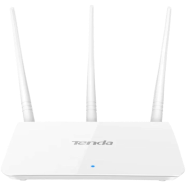
Tenda F3 300Mbps Wireless WiFi Router focuses on one goal. It provides affordable, stable 2.4GHz WiFi for small Bangladeshi apartments and student homes. Three 5dBi high-gain omnidirectional antennas deliver the wireless signal throughout a coverage area of approximately 1,400 square feet. The WPA/WPA2 encryption protects the home network from unauthorized access, while the intuitive web interface keeps setup time under five minutes for first-time users.
- WiFi Standard: 802.11b/g/n (single band, 2.4GHz only)
- Maximum Speed: 300Mbps wireless throughput
- Antennas: 3 × 5dBi external omnidirectional
- Ports: 1 WAN + 3 LAN (Fast Ethernet 100Mbps)
- Best For: Budget buyers, small apartments, basic internet use
The most affordable entry-level wireless router in Bangladesh for students and single-room users who need reliable WiFi under BDT 1,500.
Why We Picked It
Tenda F3 300Mbps Wireless WiFi Router has earned its place as Bangladesh's most recommended budget router because no other single-band option at this price point provides three antennas with consistent 1,400 sq ft coverage. The single-band 2.4GHz design is actually an advantage for users in Bangladeshi concrete apartment buildings. The 2.4GHz band passes through walls better than 5GHz. It reaches the bedroom, kitchen, and balcony without a signal booster. Thousands of Bangladeshi premium users across Rokomari reviews confirm stable day-to-day performance for browsing, YouTube, and online classes on this model.
Pros
- Three 5dBi antennas deliver coverage across 1,400 sq ft.
- Covers small apartments better than many entry-level routers.
- Reduce wifi dead zone area with three powerful antennas.
- Handles phones, laptops, and smart TVs network connection.
- Repeater mode lets you extend Wi-Fi instead of buying another router.
- Smart bandwidth controlling system.
- WPA/WPA2 encryption secures the home network against unauthorized access.
- Five-minute web-based setup requires no technical knowledge ideal for first-time router users.
Cons
- Best suited for homes that prioritize coverage over ultra-fast Wi-Fi speeds.
Buy This If
- Your apartment is small to medium-sized and you primarily use WiFi for browsing, YouTube, and online classes.
Should Not Buy If
- You have a 100Mbps or faster fiber internet plan.
- Multiple family members stream HD video or games online.
2. Tenda F6 N300 4-Antenna Wireless Router : Budget coverage-first router for small homes with more connected devices
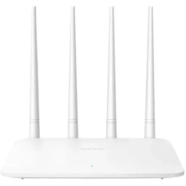
Tenda F6 N300 Wireless Router adds a fourth 5dBi antenna to the three antenna design of the earlier model. It provides wider 2.4GHz WiFi coverage for slightly larger homes and shared apartments in Bangladesh. Four external omnidirectional antennas use 2×2 MIMO technology to increase signal transmission stability and make the wireless connection more consistent across multiple rooms. WISP repeater mode with IPv6 support adds flexibility. The wireless network can extend the signal from an existing broadband router without requiring a second ISP account.
- WiFi Standard: 802.11b/g/n (single band, 2.4GHz)
- Maximum Speed: 300Mbps
- Antennas: 4 × 5dBi external omnidirectional, 2×2 MIMO
- Ports: 1 WAN + 3 LAN (Fast Ethernet 100Mbps)
- Best For: Shared apartments, families need wider 2.4GHz coverage, first-time buyers
A practical four-antenna upgrade over basic budget routers for shared apartments and families who need consistent WiFi across multiple rooms.
Why We Picked It
Tenda F6 N300 Wireless Router solves the most common complaint about three-antenna budget routers. The fourth 5dBi antenna extends the effective wireless range for home spread across two or three rooms without moving the router. The built-in bandwidth control feature allows shared home and small offices to allocate internet speed fairly among multiple users. WiFi scheduling automatically turns the wireless network on and off at set times to reduce electricity use at night. Bangladeshi user reviews consistently note the four-antenna design delivers more even room-to-room coverage compared to three-antenna alternatives at a similar price point.
Pros
- Four 5dBi antennas with 2×2 MIMO improve coverage consistency across multiple rooms.
- Bandwidth control allocates internet speed.
- Good for internet browsing, YouTube, Facebook, and online classes.
- The Qualcomm chipset helps keep connections steady during long usage sessions.
- Automatically turn off and on wireless at bedtime or work hours.
- WISP repeater mode extends an existing WiFi signal without a second internet account.
Cons
- Fast Ethernet ports limit wired device speed to 100Mbps
Buy This If
- You share a flat with multiple users and need fair bandwidth management and stable multi-room coverage.
- You want a four-antenna router that covers more ground than the basic three-antenna budget options.
Should Not Buy If
- You need dual-band performance for dedicated HD streaming or low-latency gaming.
3. TP-Link Archer C54 AC1200 Dual Band WiFi Router
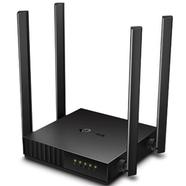
TP-Link Archer C54 AC1200 Dual Band MU-MIMO Beamforming WiFi Router is Bangladesh's most recommended mid-budget entry into dual-band wireless networking. It is built around the 802.11ac WiFi 5 standard with both 2.4GHz and 5GHz bands operating at the same time. Beamforming technology focuses the wireless signal directly toward connected devices rather than broadcasting equally in all directions. MU-MIMO allows the router to serve two devices at once without forcing each to wait in turn.
- WiFi Standard: 802.11ac/n/a (5GHz) + 802.11n/b/g (2.4GHz), WiFi 5 dual band
- Maximum Speed: 867Mbps (5GHz) + 300Mbps (2.4GHz) = AC1200
- Antennas: 4 × external high-gain with Beamforming
- Ports: 1 WAN + 4 LAN (Fast Ethernet 100Mbps)
- Best For: Upgrading from single-band routers, families with 50-100Mbps plans, students running multiple devices.
The most popular dual-band upgrade under BDT 2,500 for families and students moving off single-band routers onto fiber broadband plans.
Why We Picked It
TP-Link Archer C54 AC1200 Dual Band WiFi Router gives you access to the 5GHz band. This is the biggest upgrade for streaming HD video, joining online classes, or making video calls from home. Congestion on the 2.4GHz band is severe in Dhaka high-rise buildings where dozens of neighboring routers broadcast on the same frequencies. The 5GHz band operates on separate channels with far less interference from neighboring networks. Parental controls allow parents to restrict which devices can access the internet and for how much time. It is a most beneficial feature that is widely used by parents managing children's online time in Bangladesh. The TP-Link Tether app provides full router management from a smartphone for example network settings, speed monitoring, and device blocking require no desktop login. Bd users confirm consistent dual-band performance across medium-sized homes or flat up to approximately 1,500 square feet.
Pros
- Dual-band AC1200 with 5GHz access reduces interference in congested buildings.
- Beamforming focuses the signal directly toward devices that improves coverage consistency room to room.
- Parental controls and Guest Network managed through the TP-Link Tether app on any smartphone.
Cons
- Not suitable for gigabit fiber users.
- The signal weakens faster through thick concrete walls.
Buy This If
- Choose this router if you want your first dual band router under BDT 2,500 to avoid 2.4GHz congestion.
- Your internet plan is between 30-100Mbps and multiple family members stream or video call together.
Should Not Buy If
- You subscribe to a 100Mbps fiber plan and need gigabit LAN ports for full wired speed.
- You need WiFi 6 (802.11ax) for future-proofing and handling more than 10 simultaneous devices.
4. Cudy WR3000 AX3000 Gigabit Dual Band Wi-Fi 6 Router
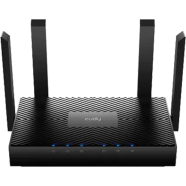
Cudy WR3000 AX3000 Gigabit Dual Band Smart WiFi 6 Router offers the most features among WiFi 6 routers under BDT 5,000 in Bangladesh. It uses a 1.3GHz Dual Core ARM Cortex-A53 processor, 256MB RAM, and four fixed omnidirectional antennas. WR3000 delivers combined wireless speeds of up to 3000Mbps. OFDMA and MU-MIMO both in the downlink and uplink increase network capacity by up to 16 times compared to WiFi 5 routers, allowing the WR3000 to serve dozens of devices together without slowing down individual connections. WPA3 encryption provides the highest level of wireless security currently available in consumer routers, protecting against brute-force attacks that WPA2-only routers remain vulnerable to.
- WiFi Standard: 802.11ax (WiFi 6) dual band
- Maximum Speed: 2402Mbps (5GHz) + 574Mbps (2.4GHz) = AX3000
- Antennas: 4 × fixed omnidirectional
- Ports: 1 × Gigabit WAN + 3 × Gigabit LAN (10/100/1000Mbps)
- Best For: Fiber internet users, smart home, multi-device families.
The best WiFi 6 router under BDT 5,000 in Bangladesh for fiber broadband users who need full gigabit LAN performance, WPA3 security, and multi-device capacity today.
Why We Picked It
Cudy WR3000 AX3000 Gigabit Dual Band WiFi 6 Router is the only router in Bangladesh that combines WiFi 6 OFDMA, full gigabit Ethernet ports, WPA3 encryption, and a Dual-Core ARM processor in a single device a combination that competing routers at this price skip one or more of. Gigabit LAN ports allow 100Mbps and higher fiber internet plans to operate at full contracted speed over wired connections. Fast Ethernet ports found on cheaper routers artificially cap wired speed regardless of your ISP plan. The built-in VPN server and client support for WireGuard, OpenVPN, L2TP, and PPTP allows remote workers in Dhaka to securely access company networks without purchasing a separate VPN device. You can add a second Cudy WR3000 later to cover a larger home or office. Your devices switch between both routers without losing the WiFi connection.
Pros
- Delivers premium Wi-Fi 6 performance at a price usually reserved for entry-level routers.
- Handles busy households with many phones, laptops, TVs, and smart home devices without slowing down easily.
- Full use of Gigabit broadband, so you are ready for faster internet upgrades in the future.
- Gives gamers and remote workers a more responsive network when multiple people are online together.
- Advanced networking features like VPN and secure DNS that are rarely available in this price range.
- Provides an excellent balance of speed, expandability, and advanced features all in one router.
- WPA3 encryption and built-in VPN server protect home and office networks from brute-force attacks and remote access threats.
Cons
- You need phones, laptops, or other devices that support WiFi 6 (802.11ax) to get the full speed.
Buy This If
- You subscribe to a 100Mbps or faster fiber broadband plan and need full gigabit wired performance plus WiFi 6 capacity.
- Your home has 10 or more connected devices including smart TVs, IoT gadgets, laptops, and phones running at a time.
Should Not Buy If
- Your internet plan is 30Mbps or slower because the gigabit hardware delivers no practical benefit at low ISP speeds.
5. Tenda AC8 AC1200 Dual Band Gigabit Wireless Router

Tenda built the AC8 AC1200 Dual Band 4-Antenna Gigabit Smart WiFi Router for fiber internet. The router uses a 1GHz Realtek processor built on a 28nm process. Tenda says this processor improves routing performance by up to 40% compared to standard budget router processors. Full gigabit ports on both WAN and LAN allow fiber broadband connections of 100Mbps and above to run at full contracted speed without the artificial bottleneck that Fast Ethernet ports create on cheaper routers. Four 6dBi external dual-band antennas with Beamforming signal tracing technology focus the wireless signal directly toward connected devices and deliver coverage across approximately 90 square meters with penetration through two layers of walls.
- WiFi Standard: 802.11ac/a/n (5GHz) + 802.11b/g/n (2.4GHz), WiFi 5 dual band
- Maximum Speed: 867Mbps (5GHz) + 300Mbps (2.4GHz) = AC1200 (1167Mbps combined dual-band)
- Antennas: 4 × 6dBi external dual-band with Beamforming
- Ports: 1 × Gigabit WAN + 3 × Gigabit LAN (10/100/1000Mbps)
- Best For: Fiber internet users, families with 100Mbps plans, apartments with concrete wall interference.
A dual-band gigabit fiber router with above-average wall barrier for families on 100Mbps broadband plans who need wired and wireless speed in one package under BDT 3,000.
Why We Picked It
Tenda AC8 AC1200 Dual Band Gigabit WiFi Router occupies a gap that budget routers and premium routers both miss. A dual-band WiFi 5 with genuine gigabit LAN ports at the lowest price. Smart Traffic Prioritisation automatically picks the best WiFi channel. This helps keep your WiFi fast in busy apartment buildings with many nearby WiFi networks. The integrated dual-band technology combines 2.4GHz and 5GHz under a single network name and it automatically allocates devices to the faster 5GHz band when within range. Broadband account automatic transfer allows the router to copy ISP credentials directly from an existing router's WAN connection.
Pros
- Gigabit LAN ports allow 100Mbps fiber plans to operate at full contracted speed.
- STP automatically selects the best wireless channel to reduce interference in busy residential areas or zones.
- Beamforming focuses the 5GHz signal through up to two concrete walls that are more practical in home structure.
- Smoother experience when streaming, gaming, and attending video meetings at the same time.
- Automatically places your devices on the faster or more stable Wi-Fi band, so you don't have to switch networks manually.
- You will get fast wired connections for gaming PCs, smart TVs, and NAS devices through Gigabit ports.
Cons
- WiFi 5 only, no WiFi 6 OFDMA or WPA3 security for households with 15+ connected devices.
Buy This If
- You subscribe to a 100Mbps fiber broadband plan and need a dual-band gigabit router at a low budget range.
- Your home has moderate concrete wall interference and you want Beamforming signal focus without paying for WiFi 6.
Should Not Buy If
- You need WiFi 6 capacity for a smart home with 15 or more device connections at the same time.
6. NETGEAR R6220 AC1200 Dual Band Gigabit Smart WiFi Router
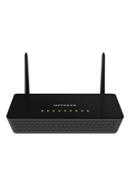
NETGEAR R6220 AC1200 Mbps Dual Band Gigabit Smart WiFi Router is an American-engineered dual-band router built on an 880MHz processor with 128MB memory. It is designed for households that prioritize network management tools and long-term reliability over price-per-feature comparisons. The double firewall protection combining SPI and NAT firewall layers creates a security architecture that consumer routers from budget brands typically omit. Ready SHARE USB access allows a USB hard drive connected to the router to be shared wirelessly across all devices as network storage, a built-in NAS function that eliminates the need for a separate file-sharing device.
- WiFi Standard: 802.11ac/n/a (5GHz) + 802.11b/g/n (2.4GHz), WiFi 5 dual band
- Maximum Speed: 867Mbps (5GHz) + 300Mbps (2.4GHz) = AC1200
- Antennas: 2 × external with Beamforming+
- Ports: 1 × Gigabit WAN + 4 × Gigabit LAN + 1 × USB 2.0
- Best For: Home office users, network-security-conscious buyers, USB file sharing.
The best-built dual-band gigabit router for home office users who need double firewall protection, USB network storage, and the NETGEAR Nighthawk app management system.
Why We Picked It
NETGEAR R6220 AC1200 Dual Band Gigabit Smart WiFi Router targets a specific buyer that other routers in this list ignore. The remote worker or small business owner in Dhaka who treats the home network as a professional tool, not just a commodity. Advanced QoS prioritizes bandwidth for video conferencing and cloud applications over background downloads. The NETGEAR genie app lets you see all connected devices, check slow connections, and test your network from your phone. It gives you more control than the basic apps on budget Tenda and TP-Link routers. Enhanced parental controls allow web filtering and internet access scheduling by individual device profiles that give parents precise control over children's online time where multiple children share the same network.
Pros
- Double SPI and NAT firewall protection provides router-level security not found on most budget routers.
- USB Ready SHARE port enables wireless network storage that can share files and media across all household devices from one USB drive.
- Advanced QoS prioritizes video calls and streaming over background traffic. Reduces freezing during home office sessions.
Cons
- Higher price than Local brand alternatives with similar WiFi 5 dual-band specifications.
Buy This If
- You work from home and need QoS, advanced security, and network monitoring tools built into your router.
- You want a USB port for wireless network storage without buying a separate NAS device.
Should Not Buy If
- You want maximum wireless coverage area because the two-antenna design covers less ground than four-antenna alternatives at this price.
7. ASUS RT-AX52 AX1800 Dual Band WiFi 6 Router
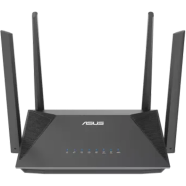
ASUS RT-AX52 AX1800 Dual Band WiFi 6 AiMesh Router is a ASUS-engineered WiFi 6 (802.11ax) router powered by a 1.5GHz tri-core processor with 512MB RAM. RT-AX52 delivers a total networking speed of 1800Mbps 1201Mbps on the 5GHz band and 574Mbps on the 2.4GHz band with full OFDMA and MU-MIMO support for multi-device. BSS Coloring helps the router ignore nearby WiFi signals on the same channel. This keeps your WiFi more stable in Flat or apartment buildings with many WiFi networks. The AiMesh compatibility means any AiMesh-compatible ASUS router can be added as a mesh node to extend the wireless network across larger homes without reconfiguring the primary router.
- WiFi Standard: 802.11ax (WiFi 6) dual band
- Maximum Speed: 1201Mbps (5GHz) + 574Mbps (2.4GHz) = AX1800
- Processor: 1.5GHz tri-core
- Antennas: 3 × external (Beamforming + Universal Beamforming)
- Ports: 1 × Gigabit WAN + 4 × Gigabit LAN
- Best For: Tech-savvy users, AiMesh network expansion, online gamers, 2-year warranty seekers.
The best WiFi 6 router for online gaming and mesh expansion in Bangladesh for users who want ASUS AiMesh compatibility, BSS Coloring interference reduction, and a 2-year brand warranty under BDT 8,000.
Why We Picked It
ASUS RT-AX52 AX1800 Dual Band WiFi 6 AiMesh Router separates itself from Cudy and Tenda WiFi 6 alternatives through the ASUS ecosystem advantage. It has instant Guard VPN activates one-tap secure tunneling through the ASUS router when connecting to public WiFi hotspots in coffee shops, university campuses, and co-working spaces. Airtime Fairness prevents slower legacy devices from monopolizing wireless channel time. An older 802.11n phone and tablet in a mixed-device consume proportionally less airtime, keeping the connection fast for newer devices. The tri-core 1.5GHz processor handles VPN, QoS, and multiple device routing at the same time without the CPU bottleneck. ASUS RT provides a 2-year manufacturer warranty on the RT-AX52 in Bangladesh that is the longest standard warranty among WiFi 6 routers.
Pros
- You will get you premium ASUS networking features without paying flagship-router prices.
- Easy to expand with AiMesh instead of replacing the router as your coverage needs grow.
- Gaming, streaming, video calls, and smart home devices running smoothly.
- Advanced VPN capabilities allow users to make secure connections.
- Greater ASUSWRT provides you greater control over the home network.
- WPA3 security and network management tools.
- Easy to monitor, manage, and optimize your network without needing advanced technical knowledge.
Cons
- The AX1800 speed class is lower than the AX3000 alternatives.
- Instant Guard VPN and AiMesh advantages matter most to users already within the ASUS ecosystem.
Buy This If
- You want WiFi 6 with AiMesh expansion capability and a 2-year warranty for a long-term home network investment.
- You live in a high-density building or area and need BSS Coloring to reduce channel interference.
Should Not Buy If
- You need maximum WiFi 6 throughput at the lowest price. The Cudy WR3000 AX3000 delivers higher speeds at a similar or lower cost.
- You only connect 3-5 devices and WiFi 5 (802.11ac) performance is already sufficient for your internet plan.
8. Ruijie RG-EW1200 1200Mbps Dual Band Mesh WiFi Router

Ruijie RG-EW1200 1200Mbps Dual Band Mesh WiFi Router is a Chinese enterprise-networking brand's entry into the Bangladesh home router market, built on the 802.11ac Wave 2 standard with four omnidirectional antennas and the Reyee Mesh system that allows multiple RG-EW1200 units to form a unified whole-home WiFi network with a single network name and seamless device roaming. The Reyee Router App provides full network management from a smartphone, including parental control scheduling, device speed limits, and a Health Mode that reduces indicator light brightness and adjusts transmission parameters during sleeping hours. a practically useful feature in Bangladeshi bedroom setups where router LED lights cause sleep disruption. Three years of warranty coverage on the RG-EW1200 is the longest standard warranty available on any dual-band router under BDT 3,500 in Bangladesh.
- WiFi Standard: 802.11ac Wave 2 (WiFi 5) dual band
- Maximum Speed: 867Mbps (5GHz) + 300Mbps (2.4GHz) = AC1200
- Antennas: 4 × external omnidirectional (5dBi, dual-band)
- Ports: 1 × 10/100 WAN + 3 × 10/100 LAN
- Best For: Mesh network builders, families need parental controls, buyers prioritizing 3-year warranty.
The best dual-band mesh ready router under BDT 3,500 for families who want Reyee Mesh expansion, app-based parental controls, Health Mode, and a 3-year warranty at mid-range pricing.
Why We Picked It
Ruijie RG-EW1200 1200Mbps Dual Band Mesh WiFi Router gives Bangladeshi buyers access to genuine mesh networking without the BDT 8,000+ cost of established mesh systems from TP-Link Deco or ASUS ZenWiFi. Two RG-EW1200 routers with Reyee Mesh cover two bedrooms and three bedrooms without dead zones. Your devices switch between both routers automatically without losing the WiFi connection. The concurrent connection capacity of 64 simultaneous devices makes the RG-EW1200 genuinely suited to small offices, tutorial centers, and shared apartments in Dhaka where device counts are high. Parental control scheduling through the Reyee Router App allows time-based internet blocking per device. Parents can restrict children's devices to specific hours without needing any desktop access.
Pros
- Reyee Mesh connects multiple RG-EW1200 routers into one WiFi network. It removes dead zones in larger apartments.
- Parents can better control their children's internet access through built-in management features.
- Large number of connected smart devices better than many entry-level AC1200 routers.
Cons
- Fast Ethernet ports are best suited for internet plans up to 100Mbps.
Buy This If
- You want dual-band mesh capability without paying for premium mesh systems, with a 3-year warranty for long-term peace of mind.
- Your home has dead zones a single router cannot cover and you plan to add a second mesh node later.
Should Not Buy If
- You subscribe to a 100Mbps+ fiber plan and need gigabit LAN ports for full wired speed.
- You are outside Dhaka and need accessible after-sales service from an established local network.
9. OLAX MC50 4G LTE High Speed Internet CPE WiFi Router
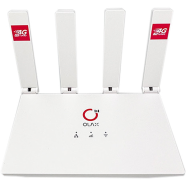
OLAX MC50 4G LTE CPE WiFi Router is a SIM-based indoor fixed wireless router that delivers 4G LTE internet without requiring any fiber or cable broadband connection. It is designed for locations in Bangladesh where wired ISP infrastructure is unavailable, unreliable, or cost-prohibitive. The LTE Cat 4 chipset supports download speeds of up to 150Mbps and upload speeds of up to 50Mbps over 4G LTE networks, covering Grameenphone, Robi, Banglalink, and Teletalk frequencies in Bangladesh. Four external folding antennas improve 4G signal reception in areas with moderate cellular coverage, and WPA/WPA2 encryption protects the wireless network from unauthorized SIM or WiFi access.
- Connection Type: 4G LTE Cat 4 (SIM-based, no ISP cable or fiber required)
- Maximum Speed: 150Mbps download / 50Mbps upload (LTE)
- WiFi Standard: 802.11b/g/n (2.4GHz)
- SIM: Nano SIM slot (supports all major Bangladeshi carriers)
- Ports: 1 × LAN (Fast Ethernet 100Mbps)
- Best For: Areas without fiber broadband, temporary internet setups, rural homes, load-shedding-affected users needing mobile backup.
Choose this router if you live in a rural or semi urban area of Bangladesh without fiber broadband and need reliable indoor 4G LTE internet with any local SIM, without ISP installation or a monthly contract.
Why We Picked It
OLAX MC50 4G LTE CPE WiFi Router provides high speed internet in Bangladeshi districts and upazila areas where fiber internet is not available. The OLAX MC50 uses AC power instead of a battery. MC50 supports more devices than a MiFi pocket hotspot. Four external antennas provide a stronger and more stable 4G signal indoors. Users in Dhaka who experience frequent fiber outages or load-shedding-related ISP disruptions can insert any 4G SIM into the MC50 and use it as an instant backup internet source without reconfiguring the home network. VoIP, QoS, and VPN support are built into the firmware. It is a practical feature set for small shops, offices, and work-from-home setups where wired broadband is not viable.
Pros
- SIM-based 4G LTE internet works without any ISP fiber or cable installation.
- Four external folding antennas improve indoor 4G signal reception in areas with moderate cellular coverage.
- Suitable for small shop setups and remote work locations without fiber access.
- Offers excellent long-term value by combining flagship-level networking features with a budget-friendly price.
Cons
- Monthly mobile data costs replace ISP subscription costs. Heavy users will find 4G data packages more expensive than fiber broadband per GB.
- You need WiFi 6 devices that support 160MHz channels to get the highest WiFi speeds.
Buy This If
- You live in an area where fiber or cable broadband is unavailable and you need indoor 4G internet from a local SIM card.
- You want a reliable 4G backup internet device for fiber outage periods or load-shedding situations in Bangladesh.
Should Not Buy If
- Fiber broadband is available in your area. Fiber delivers faster, lower-latency, and cost-per-GB cheaper internet than 4G LTE.
- You need the 5GHz band for HD streaming or gaming.
Router Recommendations by Use Case
Router for Fiber Internet in Bangladesh
Choose a router with at least one Gigabit WAN port and one Gigabit LAN port. Fast Ethernet (100Mbps) ports on budget routers prevent fiber plans above 100Mbps from delivering their contracted speed. The Cudy WR3000 AX3000 and Tenda AC8 AC1200 both provide full gigabit ports.
Router for Home Use in Bangladesh
Most homes on standard 30-100Mbps fiber plans will find the TP-Link Archer C54 (dual-band, MU-MIMO, Beamforming, Parental Controls) fully sufficient for browsing, streaming, video calls, and online classes.
Router for Gaming in Bangladesh
The ASUS RT-AX52 AX1800 provides WiFi 6 with a tri-core processor and Airtime Fairness, the combination that reduces ping variability in online games when other devices are streaming simultaneously. The gigabit LAN port allows consoles to connect via Ethernet for the lowest possible latency.
Mesh Router in Bangladesh
The Ruijie RG-EW1200 pair is the lowest-cost mesh network setup available in Bangladesh. Two units cost approximately BDT 5,500-6,600 total and cover multi-bedroom apartments with seamless roaming. The Cudy WR3000 AX3000 with Cudy Mesh support offers WiFi 6 mesh for around the same total investment.
FAQ
Which is the fastest router?
WiFi 6 routers are the fastest options available in Bangladesh right now. They support speeds above 1200 Mbps on the 5GHz band. Speed also depends on your internet plan and device compatibility.
Is ASUS better than TP-Link?
ASUS and TP-Link both perform well but serve different needs. ASUS routers focus on gaming features and advanced customization. TP-Link routers focus on affordability and simple setup for home users. Budget shoppers in Bangladesh often prefer TP-Link for better value per taka.
Is 2.4 or 5.0 GHz faster?
5GHz is faster than 2.4GHz for most home networking tasks. It delivers higher data speeds suited for streaming and gaming. 2.4GHz covers a wider range but at slower speeds.
Is WiFi 5 or 6 faster?
WiFi 6 is faster than WiFi 5 in real world performance. It handles more connected devices without slowing down. WiFi 6 also reduces lag during heavy usage like video calls and gaming.